Showing posts with label Prusa. Show all posts

Sunday, April 18, 2021

Prusa MK3 vs Voron 2.4

Which is the better printer?

Recently I had an argument with Chris Warkocki the admin of the Prusa community group on facebook where he casted some aspersions on the Voron printer. so he claimed that every of his customer printers would print much better and faster than the Voron and the Afterburner would have a very bad cooling.

So there is a lot to unpack here. 

First, of course you cannot have an unbiased opinion about other printers if you have such close ties to Prusa and being the admin of the fb fan group. That is human nature and we know fanboys from other areas in life. But let us have a look at the substance of his claims and make some comparisons.

Costs

A stock Prusa MK3s as DIY kit comes with a price tag of 769,-€. As Chris already mentioned that his printers are heavily modded, let's add the most common mods. 

The bear frame kit without printed parts 89,99€

One spool of PETG for the printed parts 25€

Bondtech extruder upgrade 120€

SE Mosquito hot-end 160€

Seems he replaced the EinsyRambo as well and tried SKR and Duet boards, even is experimenting with klipper that requires and additional Raspberry Pi. So that could range from 100€ to 300€ for the electronics, but to be fair we just assume 100€.

That is a total cost of 1263,99€ for the heavily modded Prusa MK3. Not take into account other mods like Mitsumi, Vesconite LM8UU bearings or real linear rails, different stepper motors, larger frame (z height) etc. 

For my Voron 2.4 I have spent roughly 1400€ including LDO steppers, robotdig linear rails, 4Gb Raspberry Pi 4, Meanwell power supplies, panels with printed Voron Loge, prepared cabling harness from fermio labs and stainless steel bolts and nuts order in large quantity(hundred more than I needed).

I have also added some parts that are not listed in the BoM to have a more safe printer that pushed the overall costs to 1500€

So the Voron 2.4 is a bit more expensive than the modded MK3, given the doubt the no other mods are made. Still they are in the same ballpark in regards to cost.

Features

The official build volume for the Prusa is 250 x 210 x 210 mm that cannot be 100% utilized from my experience. 

My Voron has an official build volume of 300x300x300 mm that can be 100% utilized as the motion system has 350mm linear rails.

The heat bed on a Prusa is basically a PCB that is relatively thin compared to the 8mm aluminium slab I have on the Voron. The thick aluminum plate is not only more stable and precise(machined surface), it is also more resistant to warping with temperature changes, the aluminum has more mass and is a very good thermal conductor. So the bed temperature is more stable and more unified across the surface area.

Another advantage is that the Prusa PCB head bed is powered by 150W(24V6.25A), while the Keenovo heat mat on my Voron is has 400W (230V). It heats up quicker and does not stress the power supply or board electronics.

The Prusa motion system is still based on 8mm steel roods, 2 per axis. The Voron comes with linear rails, 4 for Z, 2 for Y and 2 for X. 

Also part of the motion system are the 5 1.8° stepper motors on the Prusa(2 for Z, 1 for X,Y,E each) while the Voron has 7 Steppers in total, 4 1,8° for Z that are reduced by pulls in a ratio of 20 to 80 teeth, 2 0.9° for Y and X movements and 1 for the extruder.

In numbers that means the Tr8x8 lead screw on the MK3 with the 1.8° stepper motors allow a resolution of 0.04 mm layer height. With the Voron also with 1.8° steppers and a GT2 fully with 16 teeth, but a ratio of 1:4 gets to the same layer height of 0.04 mm. But on the X and Y the 0.9° steppers on the Voron allow for more resolution that the Prusa.

Both design use printed parts, The Prusa comes with PETG parts, ABS is used for the Voron as PETG fails in a heated chamber.

I will not rub on the EinsyRambo board on the Prusa vs my 2 SKR V1.4 turbo boards as we included 100€ for a board upgrade in the Prusa in the cost calculation above. But I guess it is obvious that the combination of 2 SKR boards with Klipper doing the heavy lifting on a Raspberry Pi outperforms the old Prusa 8bit board.

Both can use steel sheets as build pate with PEI stickers or powder coating texture that are held in place by magnets. The Prusa has some needy magnets as inlays in the heat bed PCB( that like to fall off over time). The Voron uses a magnetic sticker on top of the aluminium bed. Both are rated up to 120°C before the magnetic force degrades.

Both printers have a inductive probe for bed leveling by default that require a steel sheet. But in addition the Voron has a probe for the nozzle. That means if you swap the nozzle or the hot-end(which is very easy on the Voron) then the nozzle probe can measure the new distance of the nozzle relative to the print bed and you don't need to adjust manually every time like on the Prusa(first layer calibration).

Per design the Voron has an enclosure. That helps with materials like ABS that tend to warp, but also keeps the fumes inside. The Voron even has a simple air filtering system. 

The Prusa uses 3 pin fans that allow the firmware to detect if a fan is not spinning which could lead to overheat in case of the hot-end fan. The Voron uses only 2 pin fans by default.

In terms of security features the Prusa has some self check abilities. The Voron has a thermal fuse for the heat bed by default that kills the power to the heat mat at 120°C. 

I have added a filtered C14 power inlet in my Voron that has 2 fuses. In addition I also added a 6A circuit breaker with built-in ground fault circuit interrupter. But that is not part of the standard Voron BoM.

Print Speed

I have to admit that I did no do my own tests yet as my Voron 2.4 is not finished yet. So I can only rely on information that other Voron users share. I guess a full video of a print with a clock running is a trustworthy source. 

Problem is that there was no real "standard" print. The often used bench boat does not say anything about size, infill percentage, material etc. The range of benchy times on a Voron 2.4 range from under 10 to 14min. I have seen videos from MK3 around 15min for a benchy, but again it is hard to compare as there is no standard for the benchy.

The actual speed you put into your slicer is a desired value. Just because you put in 800mm/s it does not mean your printer can do 800mm/s. Same goes for adjustments on the printer itself. 

So there are some videos from MirageC where he claims to print with 800mm/s with his HevORT CoreXY. Vez3D has a very fast coeXY, so does Anney_Engineering.

There is even a speed benchy contest on the Annex-Engineering discord channel. They have rules for the settings that lead to more comparable results.

One Voron 2.4 from joshmurrah (standard with afterburner) with 11:15min for the benchy and one Mk3 heavily modded with bear frame, linear rails, different hot-end/extruder and running klipper with 12:43min from Techromancer that looks a bit like cheating as he uses only one corner of the bed and thereby uses the advantage that the gantry if stiffer at the end as in the middle. And his MK3 is running klipper as well.

What I have not seen is a real fast benchy from Mr Warcocki. Not even a full video of his fast prints. Sometimes he shared short video sequences on FB and claimed a speed that cold not be verified in any way. 

To understand why the bed slingers like a Prusa Mk3 can hardly beat any CoreXY is very simple. There are physical limits. While the CoreXY design has the power of two stepper motors pulling at any X or Y movement, the MK3 design has a single stepper that must move the whole print bed plus the print itself(more mass).

Having that said the current best time is a delta printer.


Conclusion

To me the Voron 2.4 stock printer outperforms the Prusa MK3, even when the MK3 is heavily modded in many areas. You simply get a bigger, faster printer that already come with an enclosure.

When you want to opt for speed you can add a high flow hot-end from the beginning and don't have to throw money for a standard hot-end out of the window.

Changing the hot-end on the Voron works like a charm and is so easy. Compared to the mess on the MK3 where you have to completely disassemble the x-carriage and cabling to the board.

Why someone would spent >750€ on a printer kit, just to throw away most parts while replacing them and spend more money instead of directly building the printer of desire is a mystery to me.

I guess you have to be a real fanboy.


Sunday, March 21, 2021

Is EVERBODY building a Voron now?

It seems like a huge community is building a Voron now. It is really hard to get the parts.

I had ordered some parts from Fermio Labs, like the print bed, the LDI stepper motor for the Afterburner hope-end and the IGUS® cable chains.

Then a few days later some more parts where available and I ordered them. Unfortunately I did not pick the frame kit in black from LDO, that was then sold out in 2 days. But I got the LDO stepper motors for X any Y axis (0.9°) and picked the wire harness.

I have could make it by myself. But if you do the math. The complete harness costs me 114,90€. If I buy a 100 meter roll of the Helukabel Heluflon®-fep-6 in 0.25 mm² it cost me around 50€. The sourcing guide says you need 250 feet (or around 77 meters). Then I need the 0.5 mm² also, plus the JST and Molex connectors (just few cents) and the work I have to spent. They advertise that the connectors are properly labeled. If you don't have the tools(I got them) you would also need to spent a fair amount of money on proper tools for the Molex and JST connectors.

Well, I will report about the quality once I receive the harness. But that seem to be a fair deal to me.

The motors for the Z axis was nowhere to find, but then I stumbled across the hobby-store.pl . The had the LDO motors and I also ordered the steel shafts as they were cheap. I am not sure if I will use them as I also have a 5mm stainless steel rod here that I wanted to use. But cutting and grinding stainless steel is a pain.

I got the screws for my Voron as well. I try to use stainless steel bolts and nuts when possible and usually order them in larger quantities by 100, 500 or even 1000. So I spent round about 100€ for the bolts and nuts.

Some small parts arrived from Chine as well. The self tapping M2 x10, the JST connector set, the magnets and the Z inductive probe sensor.

I got the Mean Well power supplies both from Amazon for a good price.

I ordered the spring steel sheets from Energetic3D store. I am happy with the ones he provided for my Prusa clones and the Elegoo Mars 2 Pro printers.

So for know I can only wait for the resining parts like the frame, the heat mat and some others to become available again. 

Then I still wait for more parts to arrive from China, like the Bigtreetech SKS V1.4 turbo boards, the fans, the nuts for the extrusion profiles and the bearings. 

There are some electrical parts missing as well. But I plan to use proper circuit breakers and ground fault circuit interrupter for this printer. I am also thinking about some LED lights and some gadgets.

One would be a nozzle camera. 


Wednesday, January 27, 2021

Triangle Labs Dragon hot-end and BMG extruder clone assembly

 So in the last post I showed off what I bought during 11.11. sale on aliexpress and after.

This time let get into building the Triangle labs Daron hot-end and their BMG extruder clone.

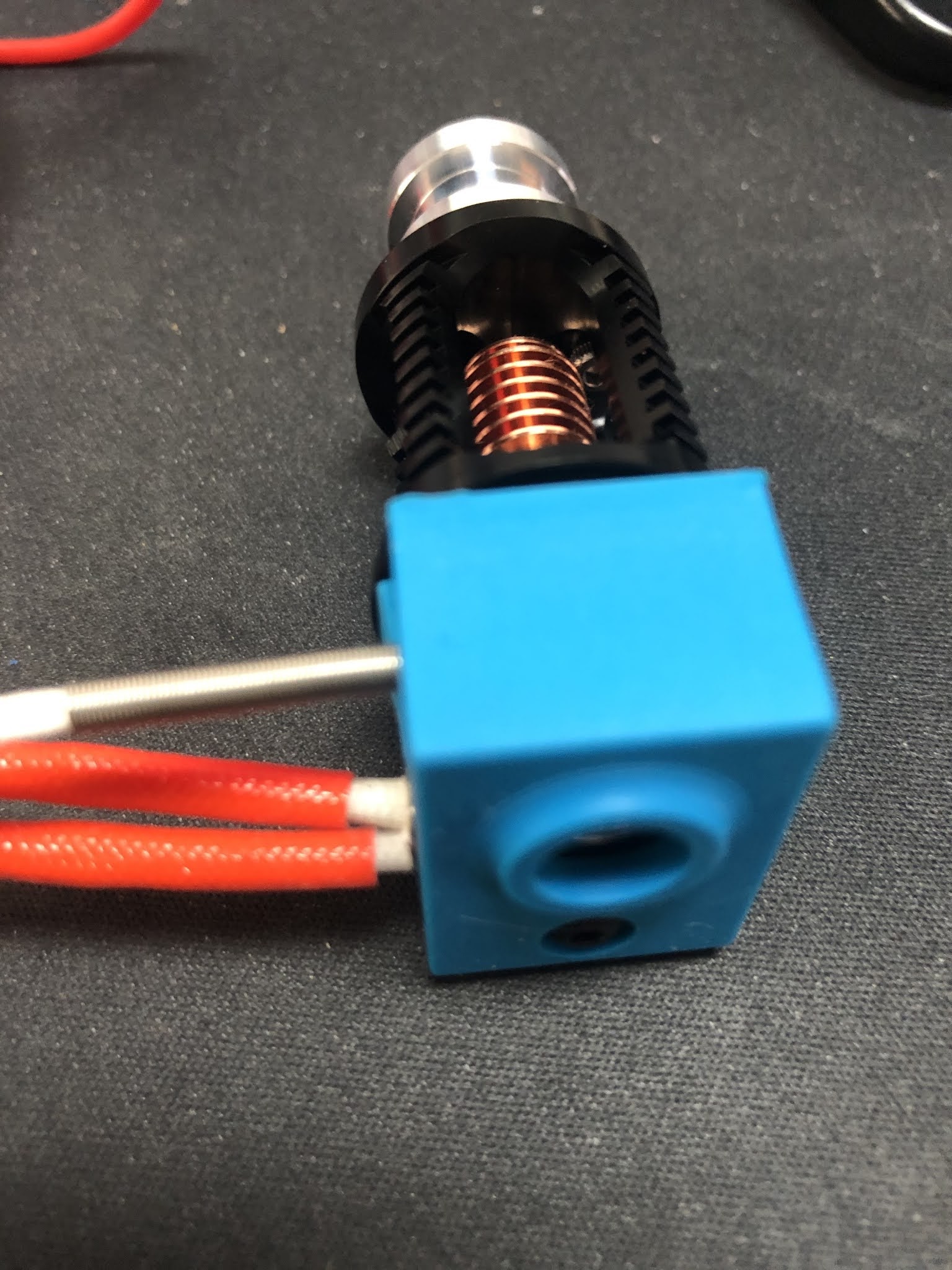
The Dragon hot-end comes in this plastic case with the parts, some spare parts and some hex wrenches. Keep in mind that you only get the hot-end, but no heater cartridge or temperature sensor.

BTW: This is the high flow (vulacno like) version. I have the normal version running in another Prusa MK3S clone for a couple of weeks now.


As I ordered the full kit of the BMG extruder there was a V6 clone included that I used to harvest the missing parts for Dragon hot-end. That included the 40W 24V heater cartridge as well as the right temperature sensor for the Prusa(clone).


I really liked the temperature sensor with the metal spring sleeve. Usually the cables of the temperature sensors are the ones that get damaged when people are careless when working on the hot-end.


Even though there was a silicon sock included with the Dragon hot-end. But I wanted to use the one from the V6 clone as well. There is a little problem with the fit as you can see.


But easy to fix with a sharp knife. Just cut the lip off on both sides for 2mm.


After that we have our Dragon hot-end nearly complete.


For the BMG extruder clone I strongly suggest to study the assembly manual from Bondtech® as a reference. 

So I will focus on the differences here and not spent the effort for a complete guide.

Frist of all download and print this little tool from Bondtech® that helps you to cut the PTFE tube to the exact length of 6.3mm. Don't forget to create a inner chamfer with a drill bit at the end.


So know it is time to start preparing the 3D printed parts. First of all I check that the filament path is ok, by sticking some filament thru it. It is a tight fit, but that is ok. You cannot have a lot of play if you ever want to print flexible filament with it. Those parts come in their own bag and have a decent quality.

Those printed parts are from the FDM conversion of the BMG extruder by Marco Zambon (Marco Z76) that shared his files on Thingiverse. Big shoutout to Marco for his work!


Then you have to mount the threaded inserts, but be careful. 

1) They are not at the same spots as the original Bondtech® BMG extruder!

2) Make sure you insert them properly with a soldering iron and don't tilt it(not like it did in this photo)!


You have to insert 3 of them, this is the first.


Here goes the 2nd.


And that is the last one.


Again, make sure the are straight in and just a smidge under the printed surface. I have heated my soldering iron up to 220°C. The prints become soft like butter at this temp and you only got one shot to get it right. If you start to wiggle around the printed part is ruined and the insert will not sit tight.

In the next step you need to insert all the square nuts and some "normal" M3 nuts. Especially this one is not reachable anymore once you have insert the hot-end. I use a longer M3 screw to push them in straight. 


Now we need to prepare the plastic gear on the shaft, as we use it as tool to press fit the bearings. Put the extruder gear with the lock screw on the shaft and make sure the lock screw is on the flat side of the shaft. Do not over tighten this screw, you will need to adjust the height in a later step and this is a very small thread that is easily damaged.


Then put one of the small 5 x 8 x 2.5 mm gears on the end of the shaft.


Now use this assembly to press fit the bearing into the 3D printed part. Make sure you don't tilt it as this will ruin the bearing and the seating. Then follow the same procedure for the other 3D printed part.


Next is to prepare the stepper motor. You need to adjust the height of the gear that there is around 1mm space between the gear and the stepper chassis. If that gear is mounted to high, you will grind down the plastic gear that interlocks with it. Make sure you got the orientation right and the little lock screw facing the flat side of the shaft.
 

Then we have to insert a M3x10 screw in this hole. It takes a bit of wiggling, but make sure to down damage anything as there will be a square nut inserted in a later step.


Next step is to mount the motor with 3 screws as shown here. The one on the left down corner is the one we inserted in the previous step. When you tighten the screw the hex wrench goes thru the hole in the 3D printed part. Again, don't mess it up! When you insert the plastic gear you can now check that the gears have proper contact with all the surface of the teeth on the plastic gear. If not, then the gear on the motor is too high.


Now it is time to insert the square nut. In my case it was not a very tight fit, so I decided to secure it with a drop of superglue. As you can see it inserted a long M3 screw to make sure there is not superglue in the threads of the nut. I also kept turning the screw to avoid the screw being glued to the nut.


I did move on to the lever next. When you open the small bag with the gears, this is how it looks like.
They put the needle bearings on the long shaft. THAT IS WRONG!


As you can see here, the long shaft is used to mount the lever in the housing, the short one is used with the needle bearings as axle for the other drive gear.


If you mix the shafts up and press fit the short one into the housing with the lever, you will not get it out anymore.

Next step is to assemble the magnets and parts for the filament sensor. Just follow the instructions from the Bondtech® or Prusa® assembly manual. 

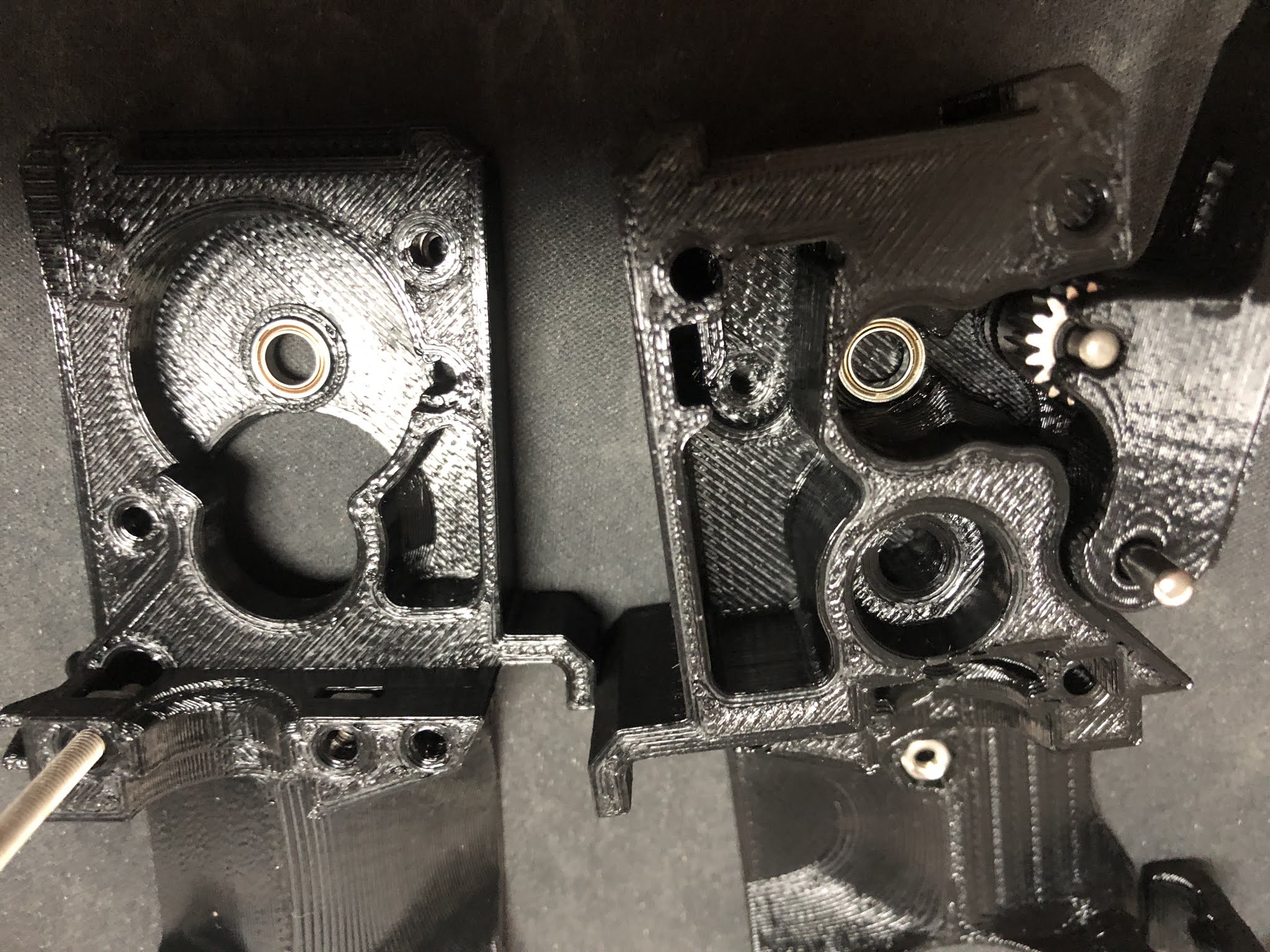
If you habe completed both side of the housing it should look like this. Make sure you have the setscrew on the shaft with the plastic gear facing to the lever(it is on the wrong side in this picture). You cannot turn the gear once the two side of the housing are together.


In my case one screw was no flush with the 3D printed part and causing problems. I ended up cutting away a little piece of plastic on the other side to make it fit.


After that it fitted perfectly and next if to use the x-carriage mount and the long M3 screws to finally hold the 2 parts of the housing together.

Next steps are outlined in details in the Bondtech® assembly manual I linked in the top of this post. Basically mount the Fans, the Pinda probe and take care of the cables. Don't forget to align the drive gear on the shaft with the plastic gear.

Once you got this done you got yourself an extruder/hot-end combo like this.


You may have noticed that there was no nozzle in the hot-end all the time. The reason is simple. I started to use the original E3D Nozzle-X in all my printers in 2019 and never had to replace a nozzle ever since. I did not have any of those nozzle at hand when I built this. But the nice thing about the Dragon design is that there is no risk of loosen up the heartbreak from the heat block when working on the nozzle. You might twist the whole hot-end in the extruder body, but you can easily twist it back in position.

I usually heat up the hot-end to 80°C and then just slightly tighten the nozzle. Especially with the copper heat blocks you can easily mess-up the heat block with too much force. Copper is a soft metal and those are small threads.

I hope that guide helped a bit if you want to build your own clone.

Last tip. If you don't have changed anything else on your clone that would require changes to the firmware, the use the firmware that Bondtech® provides for the MK3(s) and flash on the Einsy Rambo board. Besides the 3:1 ratio for the stepper motor they might have done more changes(I did not check this).
Also important! After flashing the Bondtech® version of the Firmware you have to perform a full factory reset in order to get the settings for the 3:1 ratio of the extruder stepper motor to become active. All this is outlined in their manual.


A new project "automatic cat litter box"

 I did not post any updates for a long time. I spent some time making some money with 3D printing to recover some of the costs from this hob...